
Version 3.8, features a new image overlay to review/edit the input images used by the filters in the stack. The new overlay of source images makes it easier to change or delete source images after the initial selection in the Apple Photo Picker.
In the overlay you can also rearrange the order of images for transition filters such as Dissolve.
Images are now loaded and cached faster. The ‘Ken Burns Dissolve’ is smoother in the zoom and pan movements. Some other filters are improved and several other bugs are fixed.
The Apple Photo Picker is also improved in iOS 26.5 by redisplaying your selection when it is opened again.
Hints for using the overlay:
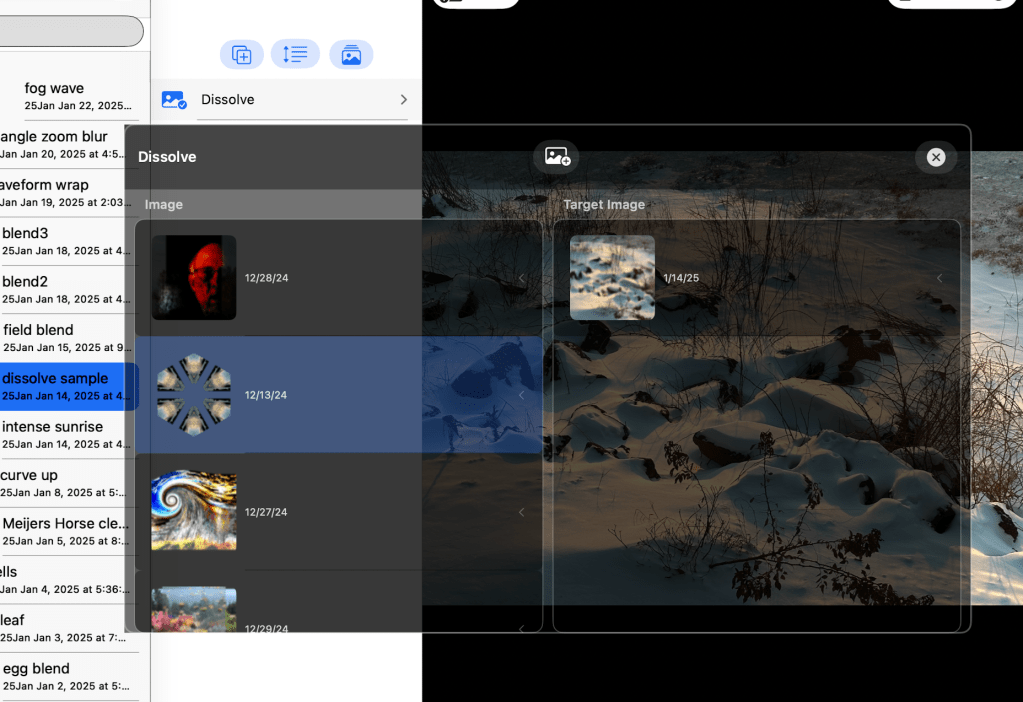
The overlay shows the current selected filter input images. Changing the current selected filter changes the overlay images. Move the selection up and down the stack to scan all of the input images. On the iPad the Parm settings window also has up/down arrows for this navigation. Move up and down the setting cells to all of the cells using an image input.
When the selected filter/setting only has input from the prior filter you will see the name of the prior filter. Go to the prior filter to examine it’s input images.
You can experiment with how different input images will look in a given filter stack. If you set a Dissolve or Images as the input you can watch and choose the most effective input images.
The new image overlay simplifies and speeds up the review process. Swipe left to delete an image. After picking a row in the overlay the ‘Add’ button is enabled.
In the various Transition filter inputs with more than one image you can drag up/down to rearrange the order.
Hope you have fun and make some great art work !


